Claiming Your Farm
Updated on April 4, 2025
Local Picks
Claiming your farm on Local Picks verifies your listing and unlocks exclusive features to connect with local food lovers. Once claimed, you gain access to customization, analytics, and more. Here’s how to claim your farm.
1. Create an Account
If you haven’t yet, you’ll need to sign up for an account on Local Picks. If you already have one, just log in to your dashboard.
2. Click “Claim This Farm”
Navigate to your farm’s page on Local Picks. If it hasn’t been claimed yet, you’ll see a Claim this Farm button.
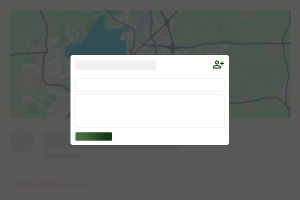
Clicking it will open a short form prompting you to:
- Provide a brief message or reason why you’re claiming this farm.
- Check a box confirming you’re the owner of this business.
Once you submit the form, our team will review your request. If approved, you’ll receive a unique claim code via email.
Tip: If you manage multiple farms, repeat this process for each listing you’d like to claim.
3. Verify With Your Claim Code
After your claim request is approved, you’ll receive a claim code. Return to your farm’s listing, and if prompted, enter this code to finalize the claim process. Once completed, the listing is officially tied to your account.
4. Expired Codes
Claim codes expire if not used within a certain timeframe. If you click the link after it has expired, you’ll see a notice that your code is no longer valid. Simply select Claim this Farm again or contact us to request a new code.
5. After Claiming
Congratulations! You now have full control over your farm’s presence on Local Picks. You can:
- Update your listing with photos, hours, and announcements.
- Add products so customers know what’s available.
- Sponsor your listing for extra visibility.
- View analytics such as page views, favorites, and more.
Keeping your listing fresh helps you connect with a growing community of local food enthusiasts.
Need Help?
If you have any questions about claiming your farm or need assistance, please contact us. We’re here to help you get the most out of your Local Picks listing!
Help Us Grow!
We're dedicated to building a community of local farms, and we need your help! Whether you're a farm owner or just a supporter of local agriculture, you can create listings and suggest edits to ensure our directory stays up to date.